
KNX IP BAOS 770
Producto descatalogado — Este producto está descatalogado por el fabricante; puede no estar disponible o solo bajo pedido.
FUTURASMUS DEVICE NAME: KNXnet/IP programming interface, 2 tunnel connections, DIN rail, Ref. KNX IP BAOS 770
INFORMACIÓN DEL FABRICANTE
| Brand | : Weinzierl |
| Reference | : KNX IP BAOS 770 |
| Family | : system-components |
| Color | : |
| Warranty | : 2 years |
| Return allowed | : No |
MORE MANUFACTURER INFORMATION
| Price group | : CD |
| Country of origin | : DE |
| Gross weight | : 592 g |
| Length | : 12.5 cm |
| Width | : 12.5 cm |
| Height | : 12.5 cm |
SPECIFICATIONS
- SYSTEM COMPONENTS TYPE
- Programming interfaces
- TYPE (PROTOCOL)
- IP
- TCP/IP GATEWAY
- Type, router / gateway
- TYPE KNX/NET-IP (ROUTE, ETC.)
- KNXnet/IP gateway, no routing
- NR. TUNNEL CONNECTIONS
- 2 tunnel connections
- INTERFACE
- KNX
- MOUNTING
- DIN rail
- GATEWAY TYPE
- TCP/IP
DESCRIPCIÓN
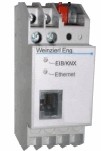
Interface between EIB/KNX-Bus and Ethernet (DIN rail mounting device) KNXnet/IP Tunnelling & Object-Server Application area The KNX IP BAOS 770 is used as interface to connect to KNX/EIB both on telegram level (KNXnet/IP Tunneling) and on data-point level (KNX Application Layer). BAOS stands for "Bus Access and Object Server". and is an enhanced version of the KNX IP Interface 730. This device can be used in ETS3 as a programming interface. In the following the functionality of the ObjectServer is described. It is possible to connect to KNX/EIB-Bus from everywhere via LAN. Bus connection over the internet with KNX IP BAOS 770 is possible as well. There are two ways to assign an IP-address to KNX IP BAOS 770. It is possible to get the IP-address from a DHCP-server or to configure it with ETS (as ETS parameter). It requires an external 12 V to 24 V power pupply or can alternatively be powered via Power-over-Ethernet (IEEE 802.3af). Functionality of the ObjectServer For an increasing number of devices, such as in the areas of multimedia and security technology, the exchange of control information with the building automation is of significance. However, for certain devices it is preferable to not access the bus directly. Instead, a connection can be established to the KNX via the Ethernet. Communication via the Ethernet is particularly interesting for devices that are already equipped with a network port. If the protocol stack for TCP/UDP/IP already exists in the operating system (like Linux or Windows® CE), applications can communicate with other devices via the Ethernet with little additional effort. If you were to use KNXnet/IP Tunnelling or Routing as a solution, the devices would be able to access the KNX network but would still have to generate and interpret KNX telegrams. It is far simpler for the KNX/IP interface to take over this task. In this case, the KNX/IP interface assumes the roll of a KNX end device. This means, that the KNX communication software of the device manages data-points in order to assign received telegrams to the according communication objects. The device independently creates and sends group telegrams, too. With the ETS (Engineering Tool Software), the group objects can be configured. In the ETS, the device appears as a conventional participant of the bus. Over the parameter dialog, data types of the group objects are configured. After that, group addresses can be set as customary. A client (for example visualization) can access data-points over TCP/IP or UDP/IP without knowledge about the KNX syntax. One client addresses a data-points over the index of that object. If group addresses in the KNX network should change at any time, the Interface can be updated without problems by an ETS-Download. There is no need to update the configuration of the clients. The interface supports up to 250 group objects and for object there is separate memory reserved. Values of the communication objects will be updated automatically when they are addressed by a telegram even if there is no client connected. This is advantageous, for example for a visualization device. If it starts or wakes up, it can read the data image from the interface without stressing the KNX bus and without a noteworthy delay. Mechanical data · Housing: plastic · DIN rail mounted device, width: 2 TE Controls · Learning key for EIB/KNX Indicators · Lerning LED (red) · Signal LED (green) for EIB/KNX · Signal LED (green) for LAN Ethernet · 10BaseT (10Mbit/s) Power supply · External power supply 12-24V AC or 12-30V DC · Alternative: "Power over Ethernet" · Power consumption: < 800 mW Connectors · EIB/KNX connector · LAN RJ-45 socket · Screw connector for power supply
GALERÍA
Envíanos tu consulta sobre este producto
Inicia sesión para enviar una consulta.
Inicia sesión para enviar una valoración.
VALORACIONES
Cargando valoraciones…